


Last Updated on September 14, 2025 by Michael Motha
Apple’s Action Button: From One To Many
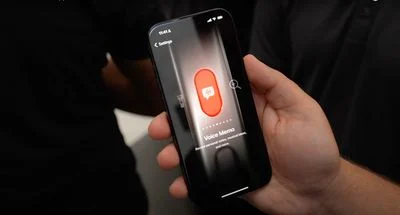
Apple first introduced the Action button as a hardware control exclusive to the iPhone Pro models. That button replaced the mute switch and allowed users to assign it to various functions: toggling focus modes, launching Voice Memos, translating text, or using accessibility shortcuts. With the arrival of the iPhone 16 line, Apple expanded the Action button to all models in that series. The move showed that the company thinks highly enough of this feature to make it part of its broader lineup, not just premium devices.
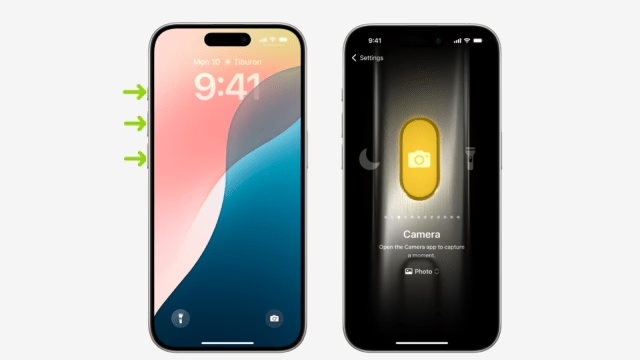
In recent months, a newly published patent has shed light on a possible next step: Apple is exploring giving future devices multiple Action buttons. According to reports, the patent suggests that what are today the volume up / volume down rockers—physical buttons used for audio control—could be made programmable in future models. In effect, Apple seems to be asking whether all of the buttons along the left edge of its iPhones could become customizable input regions.
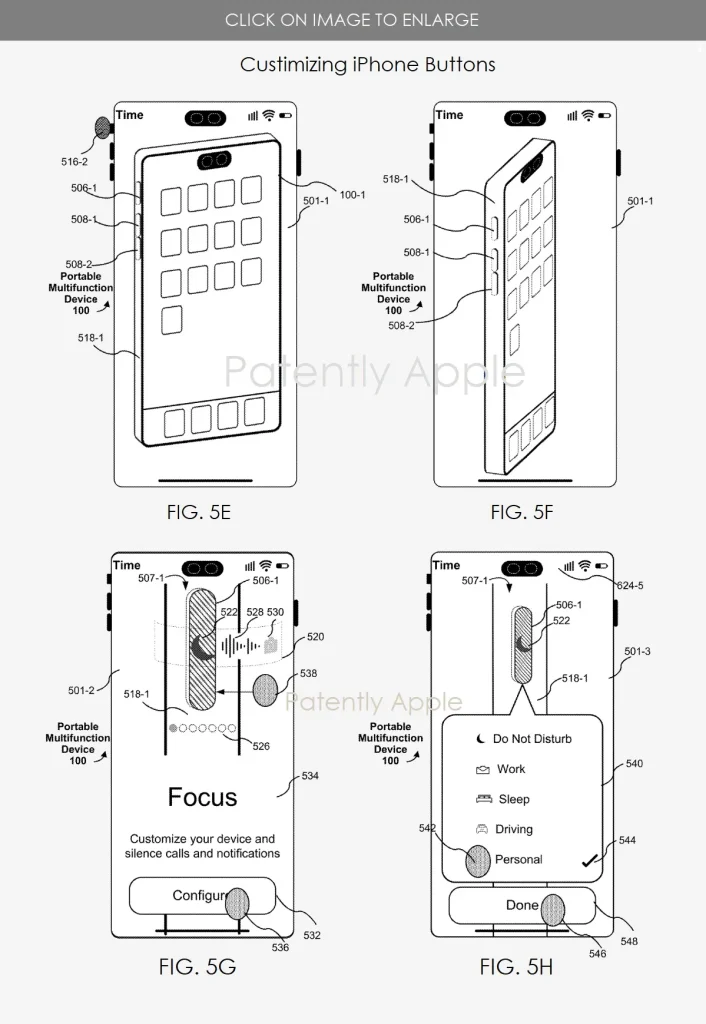
The patent describes “configurable input regions” and shows illustrations where not just the top Action button, but the volume buttons (up and down) might be used for non‑volume‑related tasks. It also proposes that these buttons would offer haptic feedback via motors, giving users a physical sensation when the button is pressed. That haptic motor detail affirms that Apple is not just thinking software, but hardware design that improves usability.
Beyond iPhones, Apple’s patent text refers to portable communications devices such as mobile telephones and iPad devices, along with portable electronic devices such as laptops or tablet computers with touch-sensitive surfaces. In other words, Apple sees that configurable input hardware could eventually appear in iPads or possibly MacBooks—especially those with touch surfaces or trackpads.
What the Patent Says and What It Implies
The patent was identified by application number 20240393933. The filing was made earlier but published recently, and it describes methods, devices, and graphical user interfaces for configuring hardware input regions. In simple terms, Apple is exploring ways in which buttons on the device (outside the touch screen) could be more flexible in their function.
Illustrations included in the patent show an iPhone with three hardware buttons along the left side being configurable. Currently, those three are: the Action button (at the top), volume up, and volume down. In present iPhone models, only the Action button is user‑assignable to different tasks. The volume buttons are fixed to audio volume control. In Apple’s drawings, all three are shown as potentially programmable. For example, the volume-down button could be assigned to call a contact instead of simply reducing audio.
Another feature in the patent is haptic feedback for these programmable buttons. That implies that when a user presses a configurable button (for example, to launch an app or activate a shortcut), the device would provide tactile confirmation—making clear that the input has been received. The inclusion of haptic motors suggests that Apple is working toward building physical confirmation of user interaction into the button interface itself.
Potential User Benefits and Use Cases
If Apple actually implements this multi‑Action button design, several user benefits follow.
Personalization would increase. Imagine setting each button for a different frequently used function: one for camera, another for voice memos or translation, and a third for accessibility or shortcuts. That could reduce friction in using the device, especially for power users.
Accessibility could improve. For users who find certain gestures or screen‑based controls difficult, having physical buttons configurable for specific tasks would simplify interactions. The haptic feedback would help in confirming inputs without needing to visually verify them.
Efficiency in workflows for creative or professional use would get better. For example, those who often take photos/videos, record voice, or need quick access to apps could assign hardware buttons to frequently used tools, reducing taps or delays.
Gaming or other fast interactions might benefit. Having extra programmable hardware buttons could allow quicker in‑game actions or shortcuts without interrupting gameplay or switching apps.
Integration with Shortcuts (Apple’s automation framework) could allow multi‑step operations tied to button presses. Users might assign a sequence to a button—press once for one action, long press for another. Although currently, the Action button supports only long presses in many cases, additional input types may be supported in future hardware.
Design and Usability Challenges
While the idea sounds promising, there are multiple challenges and trade‑offs Apple would need to tackle.
Physical layout constraints are the most obvious. The left side of the iPhone already has buttons that serve volume control, the Action button, and possibly future additional controls. Packing more configurable buttons in a way that is ergonomic, avoids accidental presses, and maintains durability is a significant design hurdle. Users with smaller hands or using the phone one‑handed might find more side buttons harder to reach or prone to mispresses.
Software design complexity must also be addressed. To avoid confusion, Apple will need a stable and intuitive interface for configuring buttons. Users should clearly understand which press (short, long, double) maps to which action. Managing cases where buttons perform unintended functions must be simple and clear.
Haptic feedback implementation includes hardware considerations. Integrating motors into the button assemblies adds mechanical complexity, cost, and takes up space inside the device. Ensuring that these additions do not affect battery life, durability, or structural integrity will be important.
Consistency across devices poses a challenge. If iPads and Macs get similar programmable buttons, their hardware designs differ significantly. Device size, thickness, button placement, and expected use cases vary across Apple’s product family. Apple must figure out a coherent user experience for configuration, feedback, and function across multiple form factors.
Accidental activations or function overlap could frustrate users. The more functions a button supports, the greater the chance of triggering the wrong one. Apple would likely implement safeguards like long‑press timers, lock modes, or contextual behavior to reduce such issues.
Manufacturing and repair implications also need to be considered. More moving parts mean more things that could break. If the buttons include capacitive sensors and haptics, replacing or repairing them may be more difficult and costly than today’s simpler buttons.
Strategic Implications: Why Apple Might Do This
Apple tends to introduce hardware innovations gradually, refining them over multiple product cycles. The history of the Action button is instructive. It started on high‑end Pro models, then became standard across the iPhone 16 lineup. Expanding to more buttons may be a logical next step.
This move aligns with Apple’s increasing emphasis on personalization and usability. As smartphone innovation plateaus, Apple has to find new ways to make everyday tasks more efficient and enjoyable. Having multiple customizable buttons would allow users to interact with their device in more tailored ways.
Apple also has an incentive to encourage deeper integration with its software services. When physical controls can be tied to features like Shortcuts, Focus Modes, or Accessibility settings, users are more likely to engage with those services. This ties users more closely into Apple’s ecosystem.
If the Action button design expands to other devices, like iPads or Macs, it could offer a unified control experience. A MacBook with programmable hardware buttons could interact seamlessly with macOS Shortcuts or trigger specific desktop workflows. Similarly, an iPad could offer button‑based control of apps or system features. This kind of cross‑platform consistency would be welcomed by users invested in multiple Apple products.
What We Still Don’t Know
The key uncertainty is whether Apple will implement the patent as-is. Patent filings represent research and development—not necessarily finalized product designs. Apple often patents ideas that never come to market. That said, the tone and specificity of this patent suggest active exploration.
How many buttons will be made configurable? Will Apple stop at three or introduce even more? Will the user be able to assign multiple actions to the same button using different gestures (short press, long press, double tap)? These details matter for usability.
Will the volume buttons lose their original function if reassigned? Or will they be dual-purpose depending on context (e.g., change volume only during audio playback)? If buttons lose their default behaviors, users may be frustrated.
How will the interface for assigning and managing functions work? Will Apple integrate this into the Settings app, or use the Shortcuts app as the management interface? Discoverability will be crucial—users must understand this feature exists and feel confident using it.
What will the haptic feedback feel like? Will it be strong enough to notice but subtle enough not to be annoying? Will it drain battery life? These implementation questions affect real-world usability.
Comparison With Other Manufacturers & Precedents
Looking across the smartphone market, very few devices offer hardware buttons as customizable as what Apple appears to be exploring. Some Android devices, particularly gaming phones, do offer customizable trigger buttons or shortcut keys, but they are niche and often implemented inconsistently.
Apple’s advantage is tight integration. By controlling both the hardware and the operating system, it can ensure a smooth experience. It can also introduce new APIs and frameworks for developers to tap into the buttons’ capabilities safely.
Apple also has a history of experimental hardware input: the Touch Bar on older MacBook Pro models, the Force Touch trackpad, and even the Taptic Engine—all show that the company values innovative, tactile user interfaces. While the Touch Bar eventually faded out, the haptic trackpad has become standard across the MacBook lineup.
This new programmable button concept might follow the same path. If successful, it could become the new standard for interaction. If not, Apple may quietly shelve it without much fanfare.
User Perspective and Context
From a user’s point of view, having multiple programmable buttons could offer real convenience. Instead of swiping through screens or navigating menus, users could trigger core functions with one press—speeding up daily tasks.
For users with accessibility needs, physical controls can be more reliable and easier to use than touch interfaces. Haptic confirmation adds a layer of feedback that helps users with visual or motor impairments.
Power users—content creators, developers, or anyone who uses automation—may find the feature particularly useful. Tying button presses to custom workflows or sequences could save time and add efficiency.
However, not everyone will want or need this complexity. Some users prefer simplicity. Too many configurable buttons could feel overwhelming. Apple will need to balance functionality with ease of use.
Durability and battery life will also be important. If users perceive that more buttons mean more risk of mechanical failure or reduced battery life due to haptic motors, they may hesitate to embrace the change.
Looking Ahead: What to Watch For
Watch future iPhone Pro leaks or hardware design rumors. If models begin showing redesigned button placements, or additional side buttons, that could signal implementation.
Check for software clues in iOS betas. If future updates begin to offer expanded Action button configuration or new accessibility features tied to hardware buttons, it could be groundwork for new hardware.
Monitor accessory trends. Apple may begin introducing cases or peripherals that highlight or protect multiple Action buttons. Similarly, Apple’s own marketing language in product reveals will likely hint at upcoming features.
Observe how iPads and Macs evolve. If future models include hardware changes along the edges, or support for new tactile inputs, that may be part of this larger strategy.
Patent continuation filings and updates are also key. If Apple continues refining this patent or files new versions, it shows continued investment in the idea.
Apple may not be ready to launch this feature in the very next iPhone or iPad, but given its track record and the steady expansion of button functionality, it seems more a matter of “when” than “if.”