


Last Updated on March 24, 2026 by Michael Motha
Introduction – Why Repurpose Your Old Smartphone
In today’s fast-paced technology world, smartphones quickly become outdated despite having capable hardware. Many tech enthusiasts are now exploring creative ways to repurpose older devices. One of the most exciting projects involves converting your old Pixel 7 Pro into a portable emulation handheld that can run retro games, apps, and DIY experiments without needing additional consoles or specialized hardware.
Using a smartphone for retro gaming is not just practical; it also aligns with sustainability goals. Instead of letting devices sit idle, you can turn them into functional tools that continue providing value. This project is appealing to both smartphone and iPhone users, demonstrating the versatility of modern mobile devices. By exploring this DIY Pixel 7 Pro emulation handheld, enthusiasts can combine their love for gadgets, mobile gaming, and technology innovation.
Whether you’re a hardcore gamer, a tech DIY enthusiast, or someone looking for a creative way to reuse old devices, this guide walks you through everything needed to transform your smartphone into a fully functional retro handheld device.
How I Converted My Pixel 7 Pro into a Retro Handheld
Turning the Pixel 7 Pro into a retro handheld is a rewarding project that blends creativity, technical skill, and experimentation. The process involves minimal physical modification but requires careful software setup to ensure smooth performance.
Step 1: Preparing the Device
Start by clearing unnecessary apps and freeing up storage space on your Pixel 7 Pro. Emulation software and retro game ROMs can take a significant amount of storage, so ensuring ample space is essential.
Step 2: Choosing Emulators
For Android devices, emulators like RetroArch, PPSSPP, and MAME provide reliable performance for retro games. Each emulator has customizable settings to optimize graphics and speed. Smartphones and iPhone users should select emulators compatible with their device ecosystem.
Step 3: Optional Hardware Modifications
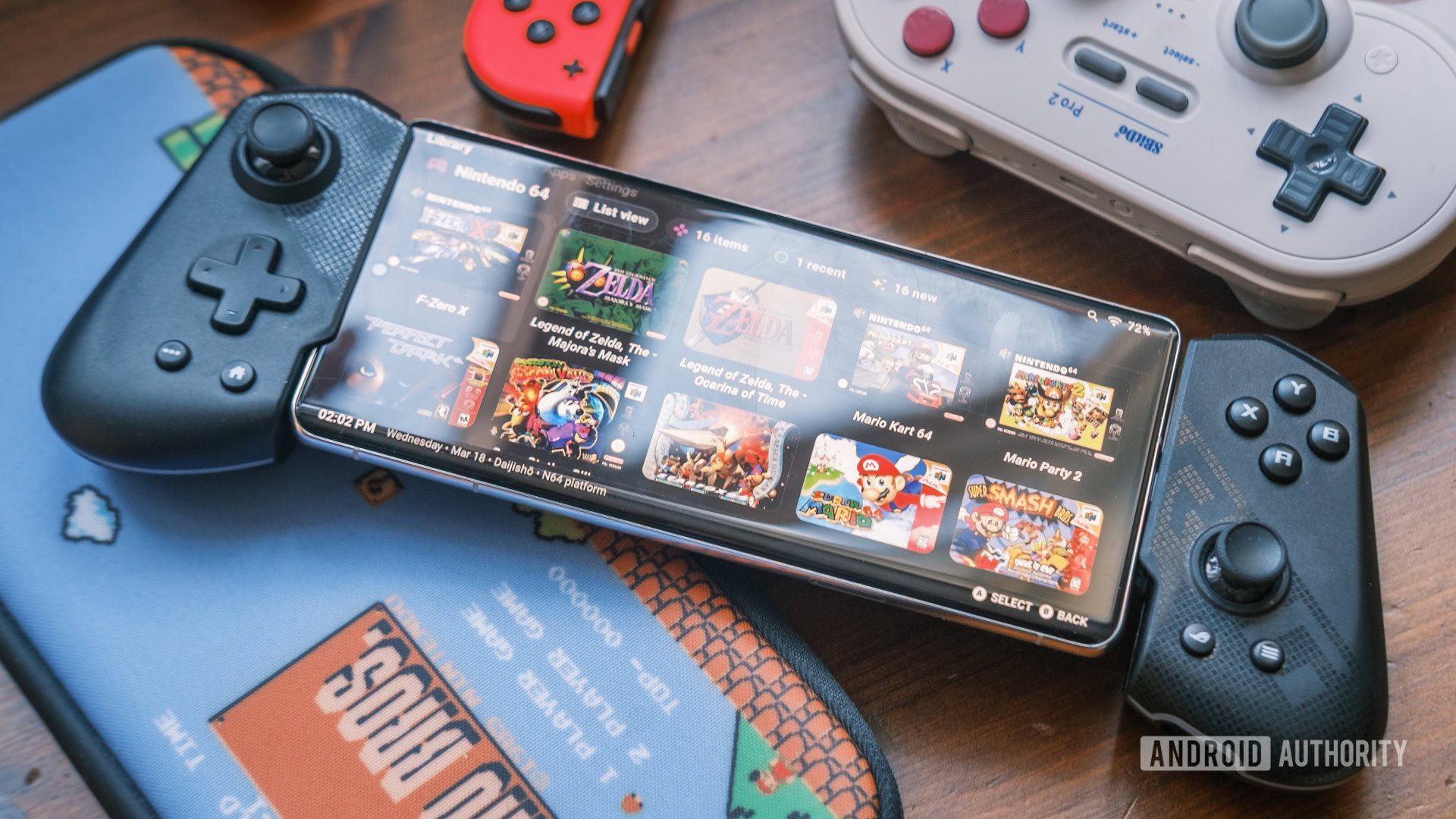
Although the Pixel 7 Pro has a built-in touchscreen, adding a controller attachment or portable case can enhance the handheld experience. Some enthusiasts use foldable stands or grips to mimic the feel of classic consoles. Cooling pads can also prevent overheating during long gaming sessions.
Step 4: Installing Games and Organizing
After setting up emulators, install ROMs for your favorite retro games. Organize them into folders for easy access, creating a console-like interface that is intuitive and enjoyable. This setup ensures a smooth experience whether you’re gaming for a few minutes or several hours.
Pro Tip: Always use legally obtained ROMs and respect intellectual property rights when downloading games.
By following these steps, your Pixel 7 Pro can become a versatile retro gaming handheld that rivals older dedicated consoles. The combination of software flexibility and hardware capability makes smartphones DIY projects like this both exciting and practical.
Hardware and Software Setup for Mobile Emulation
The success of a retro handheld device depends on optimizing both hardware and software. While the Pixel 7 Pro is already a powerful device, certain tweaks can significantly improve the gaming experience.
Hardware Essentials
- Battery: High-capacity battery ensures extended gameplay. Consider an external power bank for longer sessions.
- Controls: Optional button attachments or Bluetooth controllers enhance gameplay for fast-paced titles.
- Cooling: Long gaming sessions can cause heat build-up; keep the device ventilated.
Software Essentials
- Emulators: RetroArch is highly recommended for its versatility and cross-platform support. Other options like PPSSPP (for PSP games) and MAME (for arcade games) offer specialized performance.
- Configuration: Adjust frame rates, screen resolution, and controller mappings to suit your gaming style. Mobile devices can struggle with certain games if settings are not optimized.
- Apps: Utility apps such as file managers and shortcut organizers make navigation easier on a handheld setup.
iPhone Considerations
Although iPhone users have a more restricted environment due to App Store policies, apps like Provenance or Delta can still provide emulation capabilities. Pairing with external controllers helps mimic a full console experience.
With these setups, both smartphones and iPhone devices can achieve a retro gaming experience that is portable, efficient, and fun.
Performance and Gaming Experience on Smartphones
The Pixel 7 Pro’s hardware allows for impressive emulation performance. Retro games run smoothly, with minimal lag and high frame rates. Here’s what to expect:
- Graphics: The high-resolution AMOLED display makes old-school games look crisp and vibrant.
- Speed: Even games that demand processing power run well when emulators are properly configured.
- Battery Life: Heavy gaming can drain the battery faster than typical use, so a portable charger is helpful for extended sessions.
- Heat Management: The Pixel 7 Pro runs warm but remains safe; using cooling accessories can prevent thermal throttling.
Testing multiple emulators ensures compatibility with various retro titles. Users can experience console-style gameplay on their smartphones, showcasing how mobile technology can go beyond standard phone functions.
Optimizing Your Mobile Emulation Device
To maximize the fun and efficiency of your retro handheld, consider these optimizations:
- File Organization: Group games by console or genre for a clean interface.
- Settings Tweaks: Adjust graphics, audio, and control configurations per game to reduce lag.
- Battery Management: Turn off unnecessary apps and background services during gaming.
- Controller Customization: Map buttons to suit personal preference for an authentic console feel.
These optimizations ensure that both Android smartphones and iPhones deliver smooth gameplay without frustration.
Creative and Fun Uses Beyond Gaming
While retro gaming is the main appeal, repurposed smartphones can serve other creative purposes:
- Portable Productivity: Use the device for note-taking, calendar management, or media streaming.
- DIY Tech Projects: Combine mobile emulation with other tech experiments like AI tools or mobile automation.
- Community Sharing: Share your setup and modifications on tech forums and social media for inspiration.
Such projects highlight the versatility of smartphones, encouraging users to explore innovative ways to extend the life of their devices.
Why This Project is Exciting for iPhone and Android Users
The DIY Pixel 7 Pro retro handheld is exciting because it shows what smartphones are capable of:
- Accessibility: Both Android and iPhone users can replicate similar projects.
- Innovation: Encourages creative thinking with everyday devices.
- Sustainability: Reduces electronic waste by giving old smartphones new life.
- Community Engagement: Inspires tech enthusiasts to share ideas, tips, and builds.
This project proves that mobile devices are more than communication tools—they are portable, versatile platforms for gaming, creativity, and tech exploration.
Final Thoughts – DIY Mobile Projects and Retro Handhelds
Repurposing old smartphones like the Pixel 7 Pro into retro handheld devices is both fun and practical. This project demonstrates the potential of mobile gaming handhelds, DIY tech, and smartphone versatility.
Whether you are an Android or iPhone user, creating a retro handheld offers:
- Entertainment on the go
- Hands-on tech learning
- Sustainable use of old devices
By exploring such DIY projects, tech enthusiasts can unlock new ways to enjoy smartphones and mobile technology.